

Staying Focused on the Markets Throughout the Summer
As we move into summer, traders and investors need to be aware of what to expect in the markets, from a historical perspective and an understanding of current world events. In this month’s blog, we cover several items to be mindful, as well as the recent launch of SpaceX, and the longer-term outlook on one of the largest IPO’s in history. Read more and get ready for summer trading!

Read More: Staying Focused on the Markets Throughout the Summer
iDAS Trader: Download it Today!
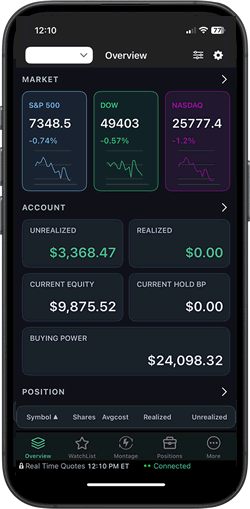
If you haven’t already, we highly recommend that you download the latest version of iDAS, as it includes many new updates and features, as well as a new look! Above is a screenshot of the new Overview screen, which gives you a better view of the markets, your account, and your positions. You can also view your account stats in terms of R-value. This screen is entirely customizable as well. Aside from this improved Overview screen, we’ve introduced the ability to perform short locates from within iDAS directly. Now, you have the ability to find shares available for shorting, all within the palm of your hand! If you haven’t done so, we highly recommend that you open your App store and download the latest version of iDAS Trader. If you love using it, please be sure to leave us a review in the app store, as reviews help keep our team motivated!
DAS Trader Software Release
During the month of June, we did not release any beta or production versions. However, production version 5.8.2.5 is available for download, and this version contains several new features, including our most highly requested feature: Seconds-based charts (sub-minute). This is still a beta feature, but we would love for our users to test it. There are several bug fixes and important updates which can be reviewed here. We recommend that all users upgrade to the latest production version; be sure to review our release notes and download the production version or use the Auto Upgrade feature under Tools>Auto Upgrade.version or use the Auto Upgrade feature under Tools>Auto Upgrade.
Weekly Webinars
Did you know that we hold weekly F.A.Q webinars? Be sure to join us every Wednesday at 4PM ET (market holidays excluded) to receive direct answers from our in-house trainers on all things DAS! Click RSVP for the next webinar.
Watch Our Streams on YouTube
Check out the DAS Trader Tips: FAQ Video and view our most recent DAS Trader Newsroom here. Be sure to subscribe to our YouTube channel for educational and trading related videos, as well as all things DAS. Finally, don’t forget to follow us on all major social media platforms by following @dastrader.